
Overview
This project explores game engine design inside the Linux kernel. The Connect Four module
loads directly into a standard Linux kernel and exposes a character device,
/dev/fourinarow, which manages game state and player input. The game can be
played entirely from the terminal using simple read/write operations, without any
user‑space program required.
Rules
For a quick refresher on Connect Four, here’s a short video overview. In this implementation, yellow always moves first.
Module Commands
RESET (R or Y): Resets the board and assigns the selected color to the player.
DROPC $: Drops a piece into column $. Only valid on the player's turn.
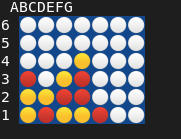
BOARD: Prints the current board state to /dev/fourinarow. Use cat to view it.
CTURN: Executes the computer’s move. Only valid when it is the computer’s turn.
User-Space Helper
Although the module can be controlled using standard terminal commands like
echo and cat, the repository includes a helper program,
connect4user, which simplifies interaction and provides a colorful UTF‑based
board display.
Connect Four Engine
The module includes a lightweight AI engine designed to operate efficiently within kernel space. It uses no auxiliary data structures and relies on simple heuristics to evaluate moves.
How It Works
Due to kernel memory constraints, the AI evaluates all seven columns using a minimal scoring system. Moves are scored based on chain length, positional value, and immediate threats.
Winning moves receive extremely high scores to ensure they are always selected. The same logic is applied defensively. Winning moves for the opponent are also good moves for the agent, as playing a move that would win the opponent the game would block them from doing so. Because of this property of connect for, strong defensive play arises from using the exact same evaluation on the opposite color's moves.
While effective for short‑term tactics, the AI does not perform multi‑move lookahead and can miss deeper strategic threats.